AI art for game development: a practical workflow
Something I keep seeing in AI game development is people getting an image they love, putting a character on top of it, and then spending weeks trying to make everything else fit.
I understand why. You generate a dungeon, it looks impressive, and suddenly you can picture the whole game. That initial excitement is useful. It gets people making things who might otherwise never have started.
But eventually you need to change something. The character disappears into the floor detail. The lighting on the walls doesn’t match the lighting on the player. A doorway needs moving. Combat needs more space. Something in the corner turns out to be a pile of objects that makes absolutely no sense when you look closely.
At that point, it is tempting to keep working on the prompt. Less noise. Cleaner textures. Better lighting. More consistent perspective.
Some of that will help. But you also need to look at how you are building the game.
This guide grew out of a community conversation about an isometric dungeon project. The developer had already put work into the character, animation and combat, but was struggling to get the background to feel consistent with everything else. I made the visual studies below to explain what I meant. They illustrate an approach; they are not screenshots of a completed engine implementation.
Why cleaning up an AI image only gets you so far
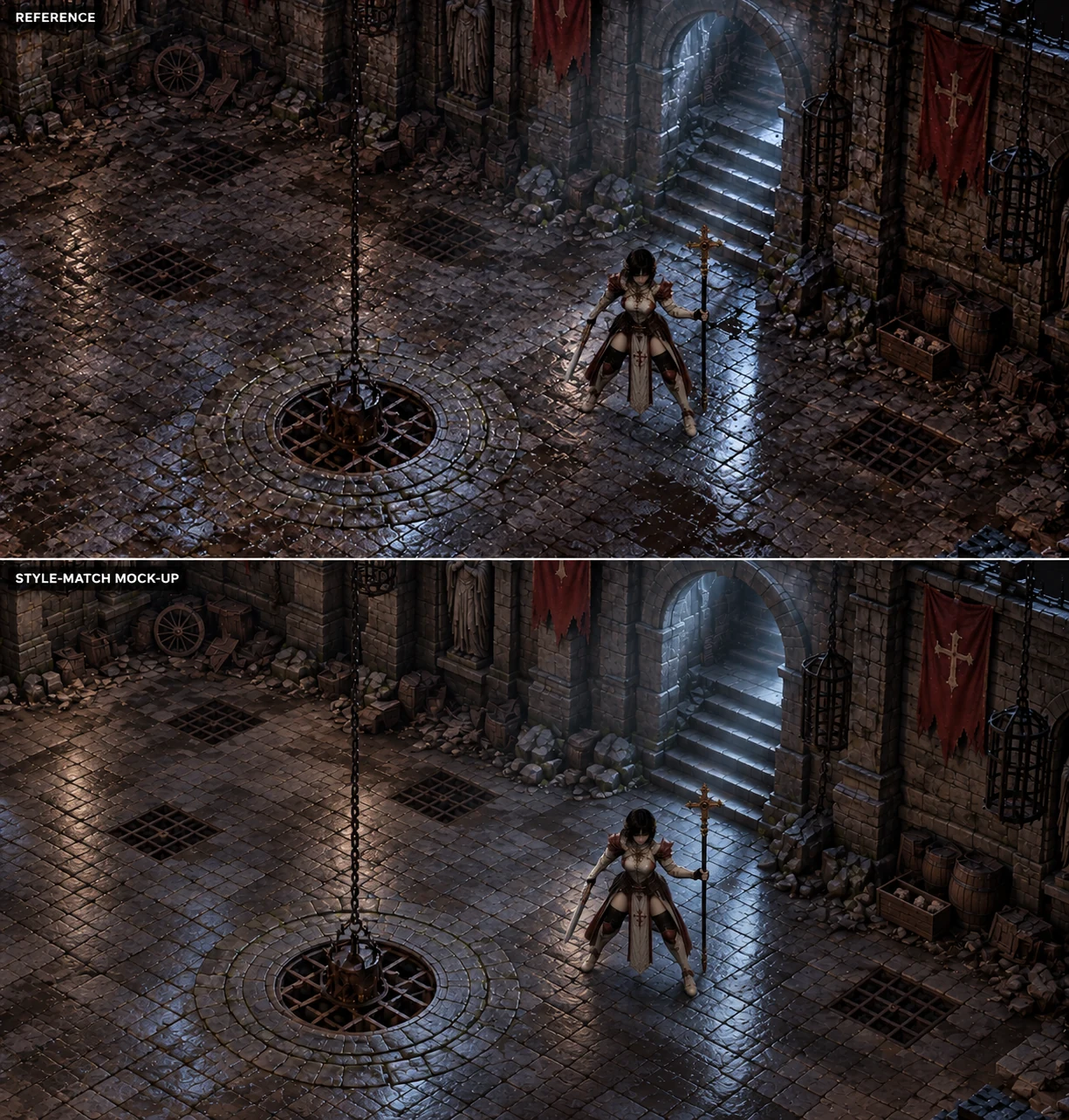
Look at how much attention the floor demands in the top image. Almost every stone has an edge, a highlight, a crack or some small variation competing with everything around it. The lower example keeps the same general atmosphere while making the floor treatment more restrained.
There is still detail. It still feels like a worn dungeon. But the surfaces have more room to read as larger shapes.
That matters because the player eventually needs to recognise enemies, follow an attack, find a doorway and understand where they can move. Once you add movement, effects and a UI, that background has a lot of other things to share the screen with.
“Less is more” sounds like vague art advice until you are trying to follow a character through a room where every floor tile wants your attention.
Cleaning up the image addresses part of the problem. It does not give you editable walls, collision, reliable attack animations or a lighting system. Those need their own decisions.
Build a playable greybox before polishing the level
A greybox, also called a blockout, is a rough playable version of a level made with simple shapes. Its job is to let you test the layout, scale and movement before investing in finished art. Epic’s greyboxing guidance describes this same purpose.
In a 2D game, those shapes can be coloured rectangles, simple tiles and placeholder sprites. You do not need to learn 3D modelling just to block out a 2D room.
Start with a floor, walls, a doorway, an obstacle, a player and an enemy. Use the camera you expect to play with. Add movement, collision and a representative attack so you can actually test the space.
It can look boring as shit. That is fine. You are trying to find out whether the room works.
Is there enough space to fight? Does the camera show enough of what is ahead? Is the character too large on screen? What happens when an enemy stands behind that pillar? Can you navigate the stairs and doorway in the way the picture suggests?
Move the wall while it is still a simple shape. Adjust the camera before making fifty assets for the wrong angle. Your checkpoint is a room you can play, with enough clarity to judge the combat.
Separate the scene into parts you can change
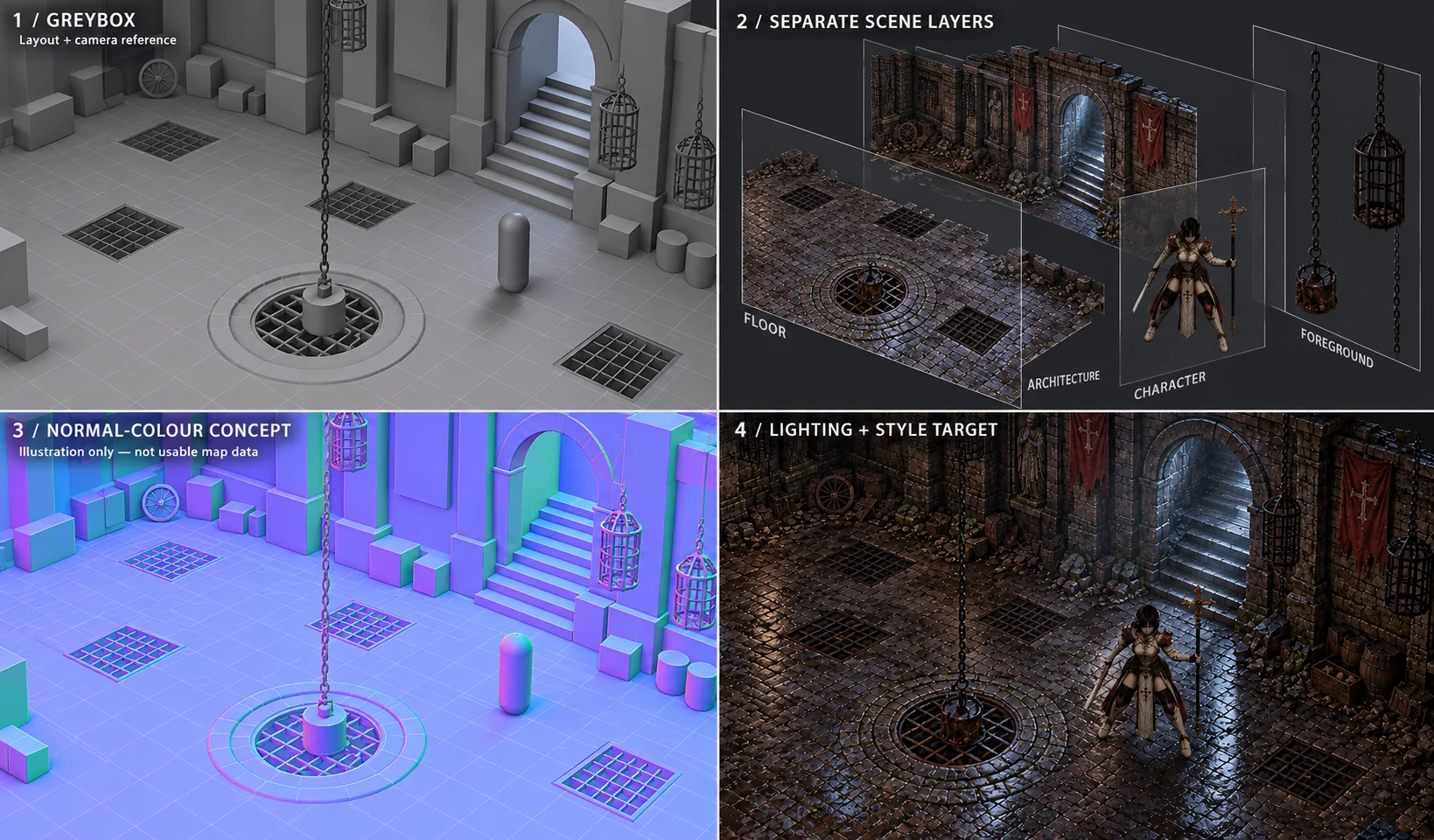
The useful part of this example is the separation between decisions.
In the greybox, you are working out the room’s structure. You can keep the archway, stairs and central feature from the concept because you like them, while changing their proportions or placement to suit the game.
In the layered view, the floor, architecture, character and foreground objects become things you can deal with independently. A hanging cage can have its visibility adjusted when it obscures the player without forcing you to repaint the room. A wall can have its own collision. The character can move through the scene instead of everything being treated as one picture.
Your actual setup might use 2D tiles, layered backgrounds, 3D geometry or a combination. Choose based on the camera and interaction you need. A rotating camera asks different things of your assets than a fixed isometric view.
Flat backgrounds are perfectly valid when they suit the design. The trouble starts when you need the flexibility of separate objects but have baked everything into one image.
For this dungeon, a useful first asset kit would be a floor section, a straight wall, a corner, a doorway and one prop. Keep doors, flames and other moving elements separate from the scenery they belong to. Test how the character passes in front of and behind objects.
Give the generator a specific production job
Once you know the camera angle, wall height, character scale and visual style, you can work on a wall section that fits those requirements. Then a corner. Then a doorway. You have something concrete to compare each result against.
Write down the rules that must stay consistent: viewpoint, scale, palette, amount of detail, edge treatment, lighting and export dimensions. Keep approved reference assets beside those rules. The 2D style-consistency guide covers the generation side in more detail.
You can build and save that brief in Art Desk. Set the medium, palette, camera, lighting and reference roles, then copy the prompt into your image tool. Keep those decisions consistent while you test the results in your game.
A useful asset brief might look like this:
Create one straight dungeon wall module matching the supplied camera and approved reference wall. Use large grey stone blocks, broad readable shapes and restrained wear. Match the reference module’s height and base alignment. Exclude torches, rubble, floor and dramatic cast shadows. The left and right edges need to join another copy cleanly.
That is a requirement to check, not a guarantee that the output will obey it. Import two copies and inspect the join. Compare their scale with the character. Correct the result or reject it if it fails.
You can still generate whole scenes to explore ideas. But for production, a small kit of consistent assets can take you further than a folder full of impressive rooms that all follow slightly different rules.
You also get to place things with intent. Rubble goes somewhere because a wall has collapsed, because it helps frame an entrance, or because it creates an obstacle. You are no longer accepting a strange pile of bones in the corner simply because it arrived with the rest of the image.
Before approving an asset, check its transparency, edges, perspective, seams and ground contact. Inspect it at gameplay size as well as close up. Keep editable source files and approved versions so a small correction does not mean regenerating everything. Record the sources and relevant permissions alongside them; the asset-rights guide covers that separate release concern.
Make the character and environment share a lighting approach
If the floor has strong blue light painted across it, the walls have orange torchlight, and the character is lit as though they are standing somewhere else, adding another glow effect will only get you so far.
Choose deliberately between baked lighting, real-time lighting or a mixture. If you want engine lights to do more of the work, account for the shadows and highlights already present in the artwork. A strong shadow painted into a texture will not disappear just because you move the light.
Normal maps can help flat artwork respond to light by describing surface directions. They need to match the asset and work correctly in your renderer. They will not fix broken perspective or turn a painted staircase into usable geometry. Godot’s 2D lights and shadows documentation explains its normal-map support and separate shadow-occluder setup.
That is why the coloured panel in the example is labelled as an illustration. Looking like a normal map and functioning as one are different things.
Prove your approach with one character, one wall and one moving light before applying it across a dungeon. If you are keeping the lighting baked, check that the character’s treatment remains convincing as they move around the scene.
Judge readability during combat
Once the environment is in place, test it with enemies, effects and the interface visible. Review actual movement at the intended screen size and zoom levels.
Start with the important silhouettes and the amount of background detail. Then adjust contrast, colour or selective outlines where needed. Making the whole room darker is not automatically an improvement; it can hide the information players need.
Check what happens behind foreground walls and pillars. Check whether an attack remains visible over the busiest floor section. If you support zooming, check both ends of that range.
A screenshot can help judge composition. It cannot tell you whether the player can follow a crowded fight.
Treat generated animation as part of the combat system
In the conversation, idle and walking animations had been relatively manageable, while attacks were proving much harder. An attack has to do more than look convincing in a short clip.
The preparation needs to be readable. The weapon needs to connect at the right moment. The recovery needs to fit the combat. The character cannot change size or slide away from their ground position halfway through it.
Before making the final frames, define the wind-up, the active damage window and the recovery. Decide when movement or another action can interrupt the animation. Then check that the visible action and the game’s hit detection agree.
Generating video and extracting frames can provide useful material, but those frames still need to work as a game animation. Check anatomy, equipment, alignment, directional views and transitions between actions. Do not assume mirroring a sprite is harmless when it reverses a weapon or a directional highlight.
Sometimes this means correcting frames. Sometimes a rigged character or a model rendered into sprites gives you more control. The useful test is whether you can revise the action reliably when the gameplay changes.
If you are still deciding whether the combat is worth building a game around, give yourself room to make those changes. A small test scene with rough art can answer questions that another polished environment image cannot.
Finish one representative room, then expand
Build one small section that combines movement, combat, environment art, lighting, animation and enough sound and UI to judge the experience. This is your vertical slice: a representative piece of the game and a test of how you make it.
Try changing it. Widen the doorway, move a light, add an enemy and shorten an attack’s recovery. If each adjustment forces a rebuild of everything around it, solve that before producing more rooms.
Measure performance on the intended hardware. Large textures, transparent layers, effects and lights can all contribute to the cost of a scene. Check the actual build before deciding which part needs optimisation.
Before expanding the dungeon, you should be able to answer yes to these:
- The room is playable with the intended camera, movement and combat.
- The player, enemies, attacks and exits remain readable during a fight.
- Repeated assets agree on scale, perspective and style.
- Important scene pieces can be moved or replaced independently.
- Lighting and animation work in the engine, not only in a mock-up.
- The room runs acceptably on the target hardware.
- Source files and approved assets are saved so another room can reuse them.
Then repeat the cycle: define what the next room needs to do, block it out, playtest, reuse the kit, make only the missing pieces, and test again.
Give yourself time to make creative decisions
When another version is one click away, it becomes very easy to keep looking for a better result without deciding what “better” actually means. You can spend an evening producing variations and finish with more options, but no clearer direction.
Building the scene piece by piece forces you to think. You notice that the entrance would work better somewhere else. You find a more interesting use for the central structure. You realise half the decoration is unnecessary. Those discoveries become part of your game’s identity.
AI can help throughout that process: exploring concepts, making variations, assisting with blockouts, producing textures, cleaning assets and helping build tools. You still need to decide what belongs, what works and what needs another pass.
For this dungeon, I would keep the atmosphere that made the developer want to build it in the first place. Then I would make one room playable, establish a small asset kit, get the character and environment working together, and test it with actual combat happening on screen.
You should be able to move the doorway, change the fight and improve the scene without having to start the whole picture again.
If you want feedback, share a short gameplay clip or a playable room with one specific question about readability, movement or combat. The feedback guide explains how to make that request useful.
When you are ready to take the project towards release, the Steam indie game marketing guide covers audience research, demos, wishlists and launch planning.